· By Ivan Liljeqvist
MoneyLine vs Supertrend: What’s the Difference?
Bullmania founder Ivan Liljeqvist compares MoneyLine and Supertrend: ATR signals, confirmation candles, backtesting, macro context and the Money Scanner, with dated examples and clear trade-offs.
Updated
The short answer
Bullmania MoneyLine is built on the same ATR-based trend-following concept as Supertrend, but adds asset-specific tuning, confirmation candles, a visible Flip Level, multi-timeframe context and built-in backtesting. It also connects to the Money Scanner, Bullmania AI and Bullmania’s mechanical trading rules. Standard Supertrend is an individual chart indicator. MoneyLine is one part of a trading system.
A note from the founder. I’m Ivan, the founder of Bullmania. This is my explanation of a tool I built. MoneyLine isn’t a nameless indicator from a script library. It’s the tool I use every day in my own trading and across my social media, and I’ve used it on my YouTube channel for over five years. You’ve probably seen it there, and that may be why you’re reading this. When I explain how it works, I’m explaining something I use in public, every day.
That said, no one knows the future. Like every other indicator, MoneyLine can’t guarantee any results and all trading involves risk.
Key takeaways
MoneyLine shares Supertrend’s core concept: a trend line with bullish and bearish states.
Confirmation settings, a Flip Level, daily/weekly alignment and a backtesting table distinguish MoneyLine’s workflow.
The built-in FRED Heat Map displays macroeconomic context alongside price signals.
Bullmania’s Money Scanner and Bullmania AI use MoneyLine data, not standard Supertrend signals. Without the full end-to-end system, an indicator alone is very difficult to use, and that is why MoneyLine is integrated into the whole Bullmania ecosystem.
The Bullmania team adapted the Supertrend idea with one clear intention: fewer fake-outs and a stronger, clearer picture of the trend.
Neither indicator replaces stops, position sizing or a written trading plan.
That is why Bullmania is built around mechanical rules, education, a community and daily accountability, not just an indicator.
Money Scanner and Bullmania AI make those rules easier to follow. Discipline and mindset are the parts no tool can do for you.
What is Supertrend?
Supertrend is a trend-following indicator based on Average True Range (ATR), a measure of price volatility. It plots a line above or below price to indicate bearish or bullish direction and can be used as an input for positioning stops.
A commonly used configuration is a 10-period ATR with a multiplier of 3. Both inputs are adjustable. Supertrend is not restricted to one fixed setting across every asset or timeframe.
How Supertrend is calculated
Its basic bands begin with the midpoint of each candle and a multiple of ATR:
Upper band = (High + Low) / 2 + (Multiplier × ATR)
Lower band = (High + Low) / 2 − (Multiplier × ATR)
Final bands also depend on previous bands and the previous closing price. In an uptrend the active line follows the lower band; in a downtrend it follows the upper band. Closing-price conditions determine a change in trend direction. TradingView’s documentation provides the complete calculation, linked below.
Where Supertrend struggles
Whipsaws: sideways price action can repeatedly cross the line and alternate bullish and bearish signals.
No complete plan: the line does not decide your account risk, asset selection or execution rules.
Limited context: the standard indicator does not include a macroeconomic heat map or a separate daily/weekly alignment panel.
These are limitations of the standard indicator, not every custom implementation. Supertrend can be combined with strategy scripts, scanners and other tools. A wick through the line alone is not the standard closing-price flip condition.
How MoneyLine differs from Supertrend
MoneyLine keeps the clear line and two trend states, then adds tools around it:
Asset-specific tuning designed to reduce repeated flips in lower-timeframe sideways markets.
Configurable confirmation candles. More confirmation may filter noise but delay a signal.
A visible Flip Level showing the threshold relevant to a potential trend change, subject to the confirmation rules.
A panel showing trend, last flip price/date, percentage move since flip and daily/weekly alignment.
Proximity to the 200-week moving average and all-time high.
Built-in backtesting for the selected asset, timeframe and confirmation setting.
Bullmania’s written entry, exit, stop-loss and position-sizing rules.
MoneyLine vs Supertrend: comparison table
Feature | Standard Supertrend | Bullmania MoneyLine ecosystem |
|---|---|---|
Core idea | ATR-based bullish/bearish line | Supertrend-style bullish/bearish line |
Settings | Adjustable ATR length and multiplier | Asset-specific tuning and confirmation settings |
Sideways markets | Can whipsaw | Designed to reduce repeated flips; still can whipsaw |
Flip confirmation | Standard closing-price conditions | Configurable confirmation candles |
Dedicated Flip Level panel | Not built in | Included |
Weekly/daily alignment panel | Not built in | Included |
200-week MA and ATH proximity | Not built in | Included |
Macro context | Price-based indicator | Built-in FRED Heat Map alongside trend |
Integrated backtesting table | Separate strategy or testing setup needed | Included |
Entry, exit and stop-loss rules | Supplied by trader | Bullmania mechanical rules |
Cross-market scanning | Requires additional tools | Money Scanner |
Relative strength | Requires additional tools | BTC, ETH, SOL and S&P 500 quote filters |
Plain-English queries | Requires additional tools | Bullmania AI using MoneyLine data |
Access | Widely available on charting platforms | Part of Bullmania membership |
The MoneyLine backtesting workbench
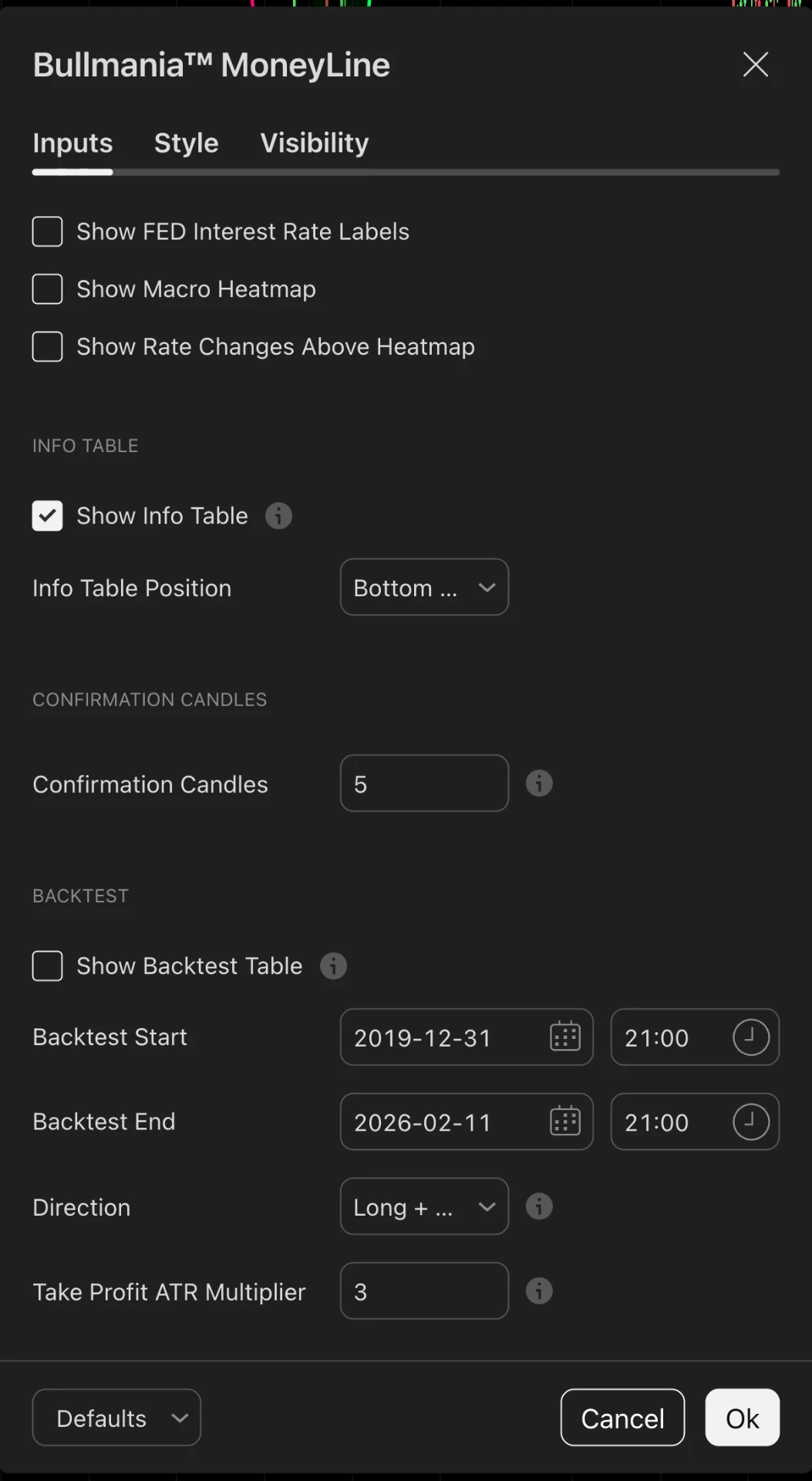
MoneyLine’s built-in table lets you inspect historical signals on the chart in front of you. Think of it as a workbench, not a forecast. Trending assets can suit trend indicators; choppy markets can produce very different results.
Compare Bitcoin, Solana, stocks, ETFs, gold or forex; compare 1-hour, 4-hour, daily and weekly charts; and change confirmation settings to examine the trade-off between signal frequency and reaction speed.
Any backtesting examples, assets, charts, trades or scenarios shown are examples used to explain the method, not recommendations or signals. Historical data, backtests and past examples do not predict future results or future performance of the indicator.
How to use the backtesting table
Open the asset’s chart with MoneyLine applied.
Choose the timeframe you actually plan to trade.
Inspect the backtesting table for that chart.
Change the confirmation-candle setting and compare signal frequency and timing.
Repeat on a higher timeframe and understand any differences.
Record the chosen asset, timeframe and setting rather than changing them after every losing trade.
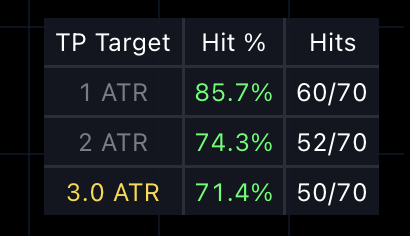
Check both where the tool fits an asset’s behavior and where it struggles. When evaluating any backtest, consider costs, slippage, the sample period and whether results hold beyond the data used to select settings. Historical results do not guarantee future performance.
Macro context with the FRED Heat Map
FRED is the Federal Reserve Bank of St. Louis’s public economic database. MoneyLine’s built-in FRED Heat Map displays macroeconomic data alongside the chart, so members can examine the price trend and economic backdrop together.
Interest rates, liquidity and economic conditions can affect risk appetite. The heat map provides context; it does not prove a signal will succeed. Displaying FRED data alongside a trend should not be interpreted as a claim that the data directly changes MoneyLine’s trend calculation.
Real-chart examples: 4-hour timeframe, October 22, 2026
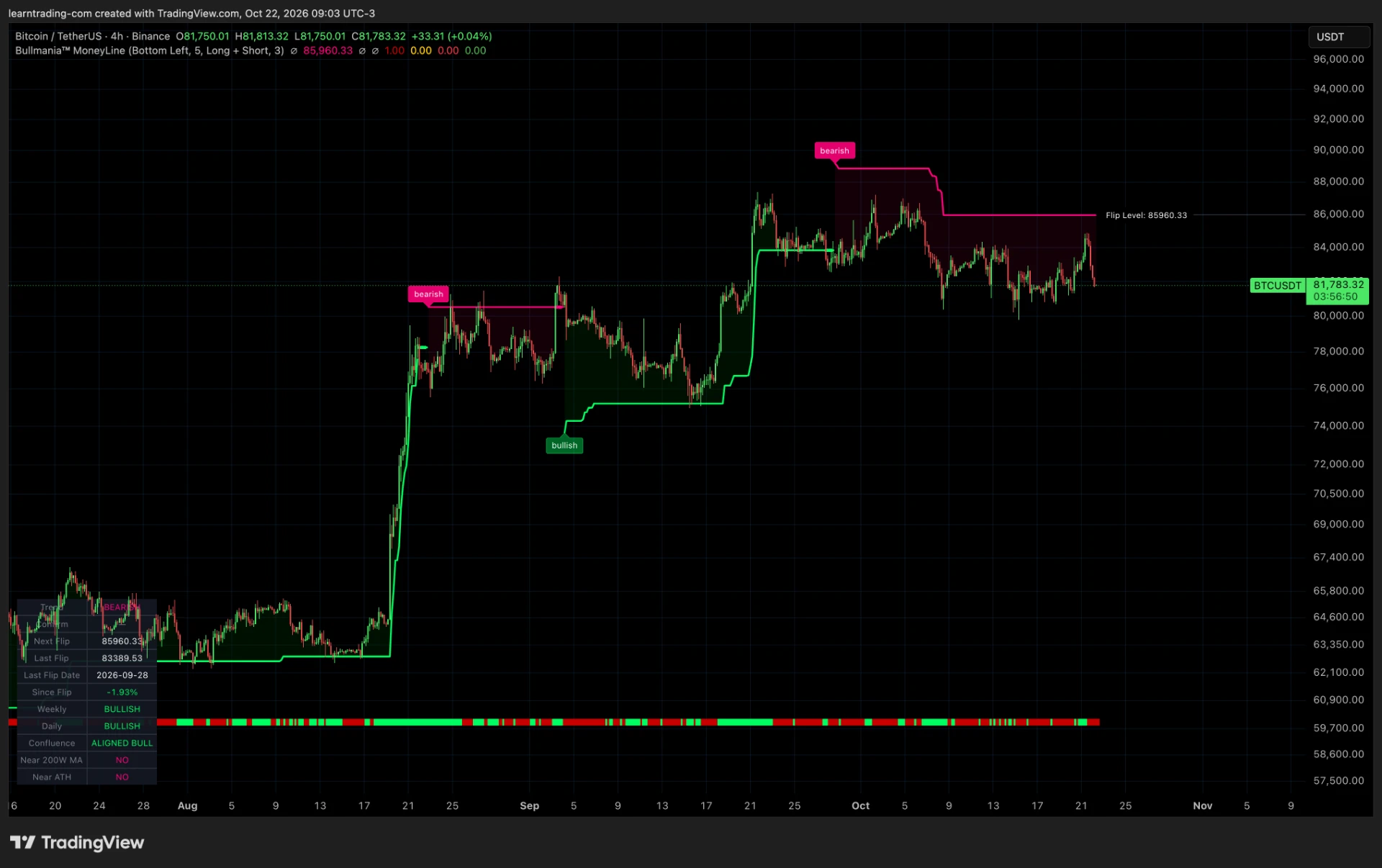
These two pairs of charts show the same market, on the same 4-hour timeframe, at the same moment. The only difference is the indicator. Look at how often each line changes colour. Supertrend flips back and forth again and again. MoneyLine stays on one side much longer. That is the whole point of these pictures. They are dated examples to explain how the tools behave, not recommendations, signals or performance results.
Bitcoin: BTC/USDT, 4-hour chart
Bitcoin spent weeks moving sideways in a choppy range. This is exactly the kind of market where a trend line gets tested. Watch what each indicator does with that chop.
First, MoneyLine. Notice how few colour changes there are. Through the whole sideways stretch, MoneyLine changed direction only a handful of times and then held its state.
Now the same Bitcoin chart with Supertrend (10, 3). The line keeps switching between green and red. Every small move inside the range triggers another flip, so it is hard to tell what the trend actually is.
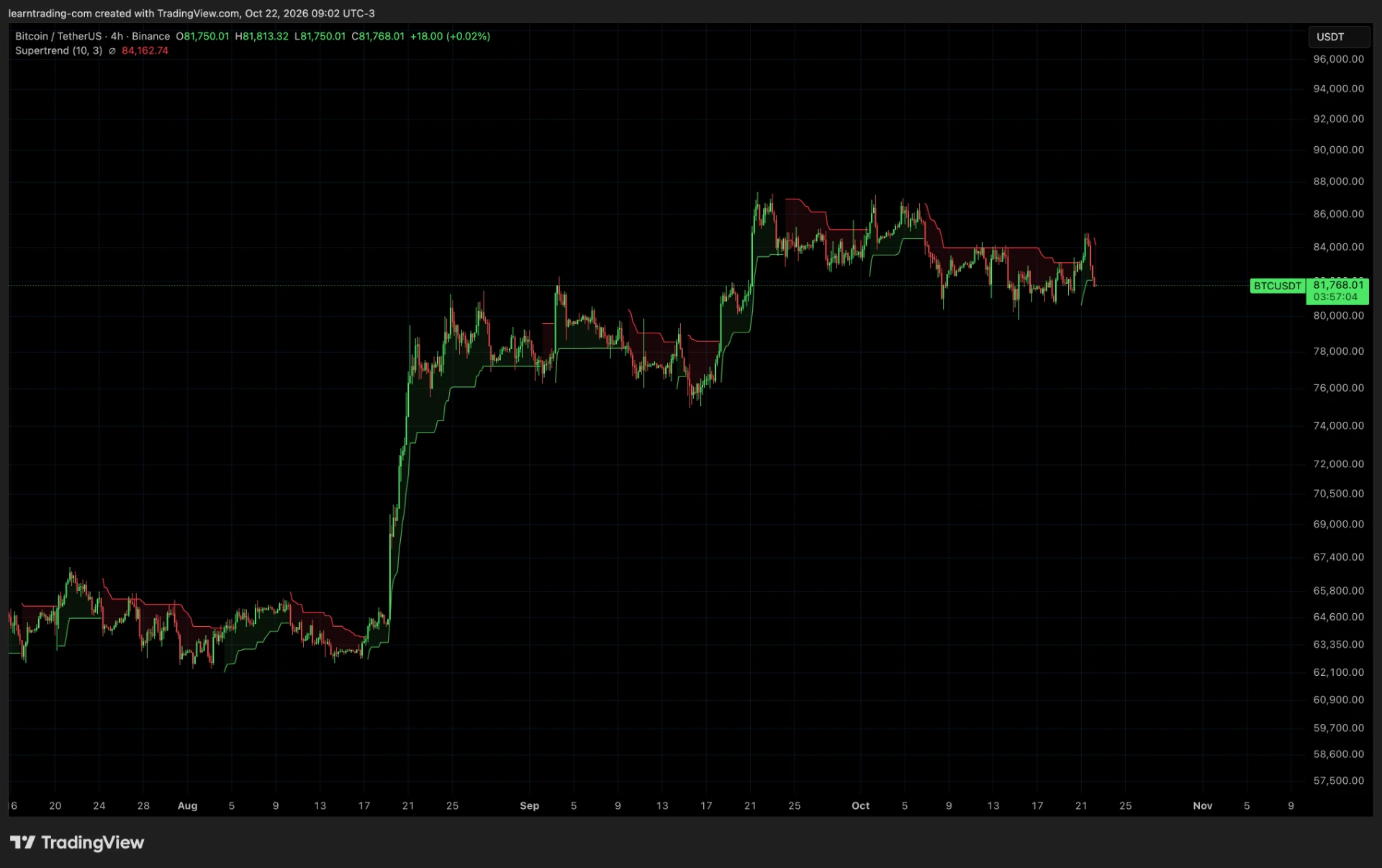
Side by side the difference is clear. In this example, Supertrend is whipsawing while MoneyLine is more stable.
Solana: SOL/USD, 4-hour chart
Solana also moved sideways for a while. Again, compare how often each line changes colour.
First, MoneyLine. It made its move and then stayed on the same side, without reacting to every small bounce.
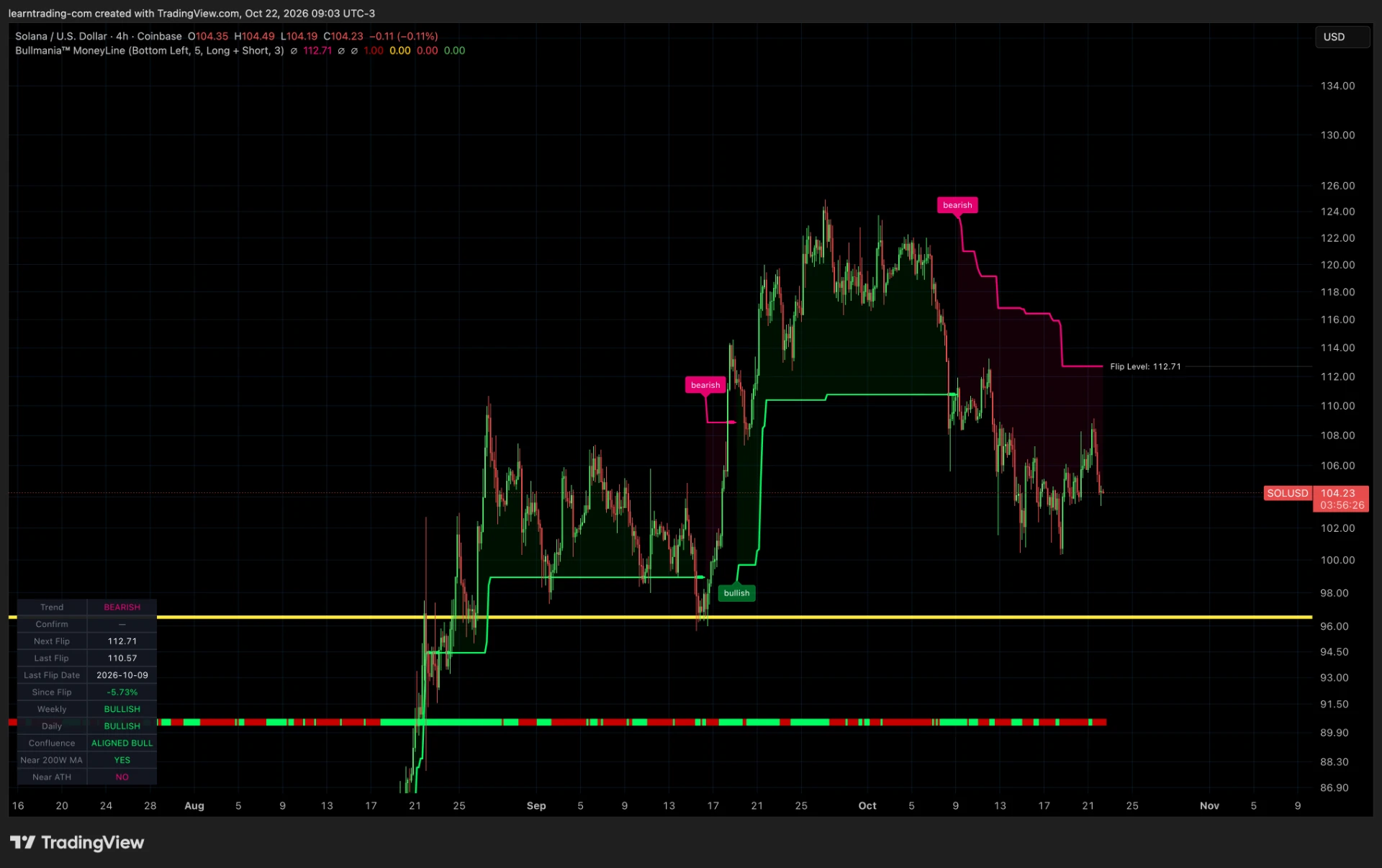
Now Supertrend on the same Solana chart. It flips bullish, then bearish, then bullish again as price moves up and down inside the range.
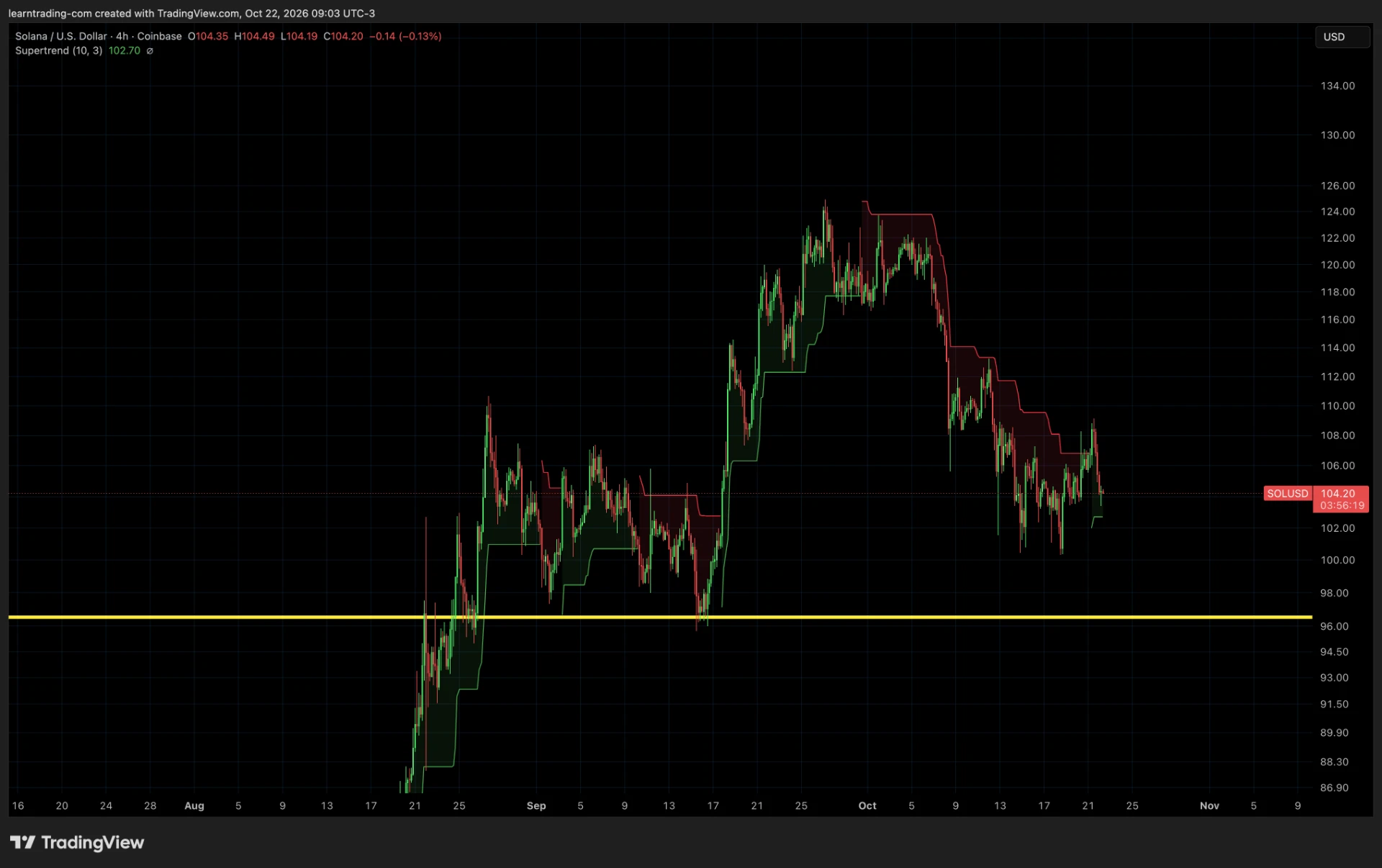
Same market, same timeframe, same moment. In this example, Supertrend keeps flipping back and forth, while MoneyLine is more stable. That is the difference MoneyLine is designed for. Fewer flips do not guarantee any result, and all trading involves risk.
The honest trade-off
A line that flips less often may catch a new trend later. Filtering sideways noise and reacting quickly are competing goals. Two examples cannot establish consistent outperformance. Compare longer periods, multiple assets and settings before drawing a conclusion.
The Money Scanner: MoneyLine across multiple markets
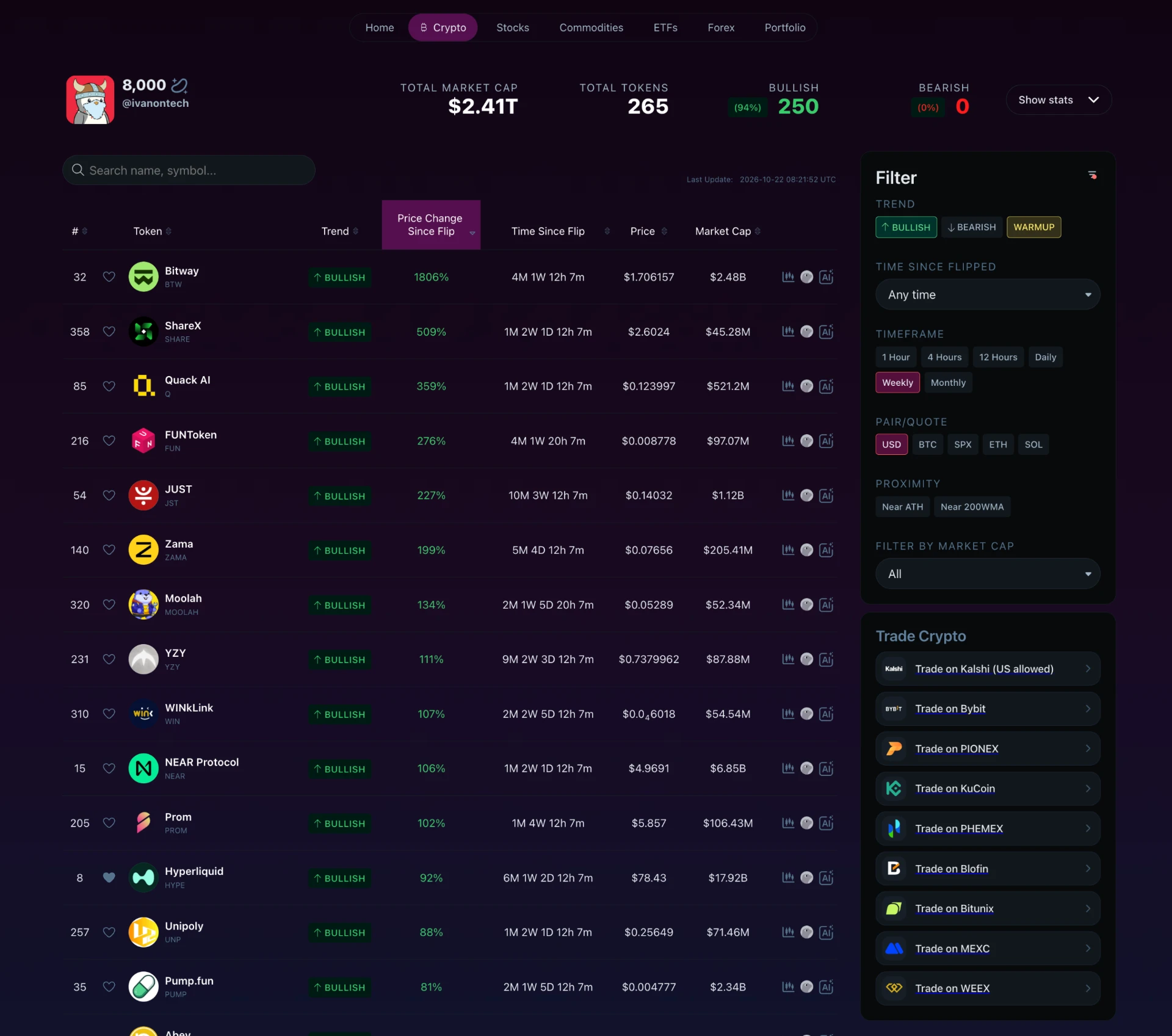
An indicator on one chart answers what that asset is doing. Bullmania’s Money Scanner applies MoneyLine across hundreds of assets in crypto, US stocks, ETFs, commodities and forex, displaying results in a sortable table.
In the supplied October 22, 2026 snapshot, the crypto tab tracked 265 tokens with $2.41 trillion total market cap and showed 250 (94%) bullish on the weekly timeframe. Those are dated observations, not the current market state.
Rows show trend, price change since the last flip, time since flip, current price and market cap, with shortcuts to charts and Bullmania AI.
Scanner filters
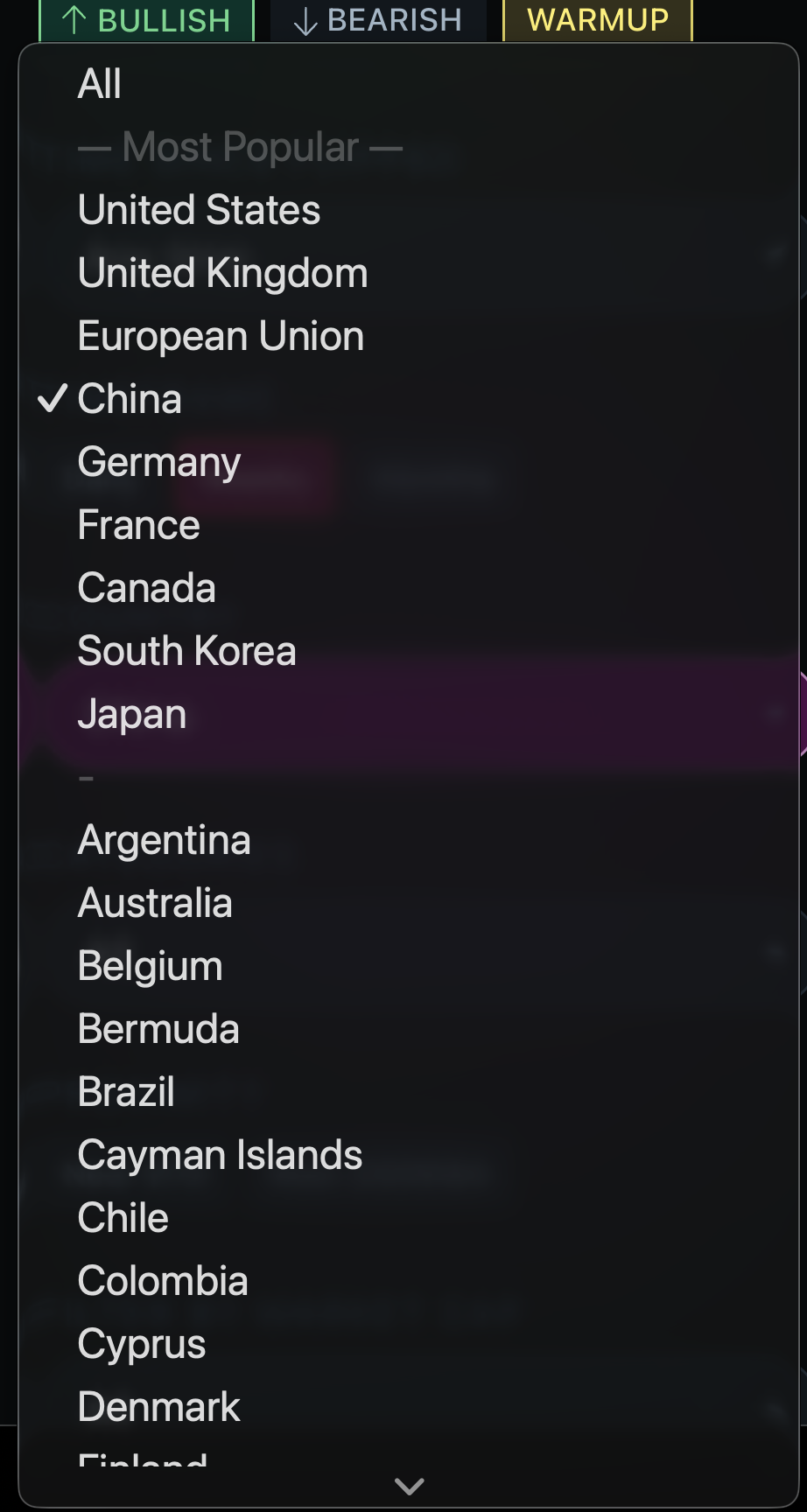
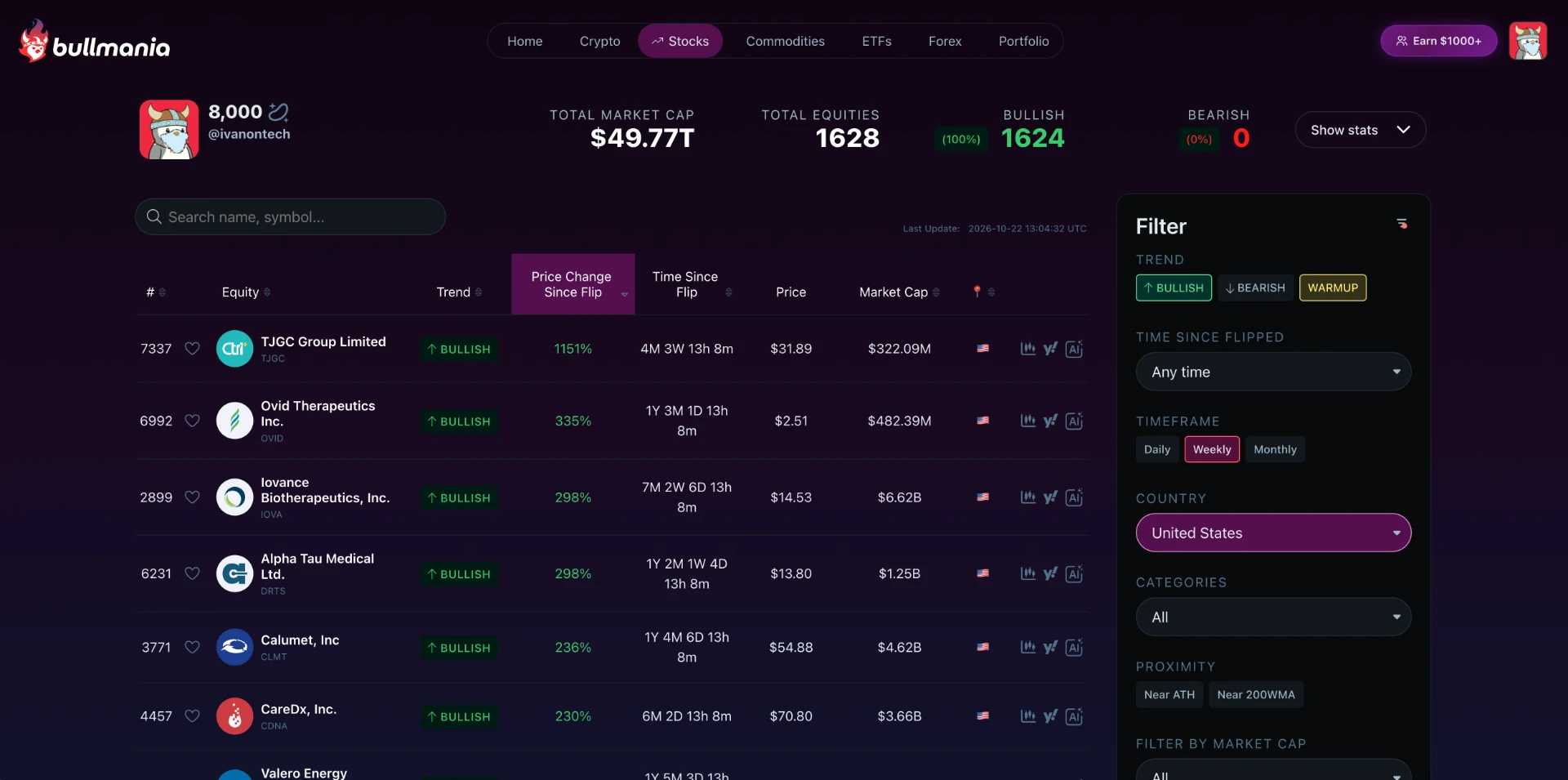
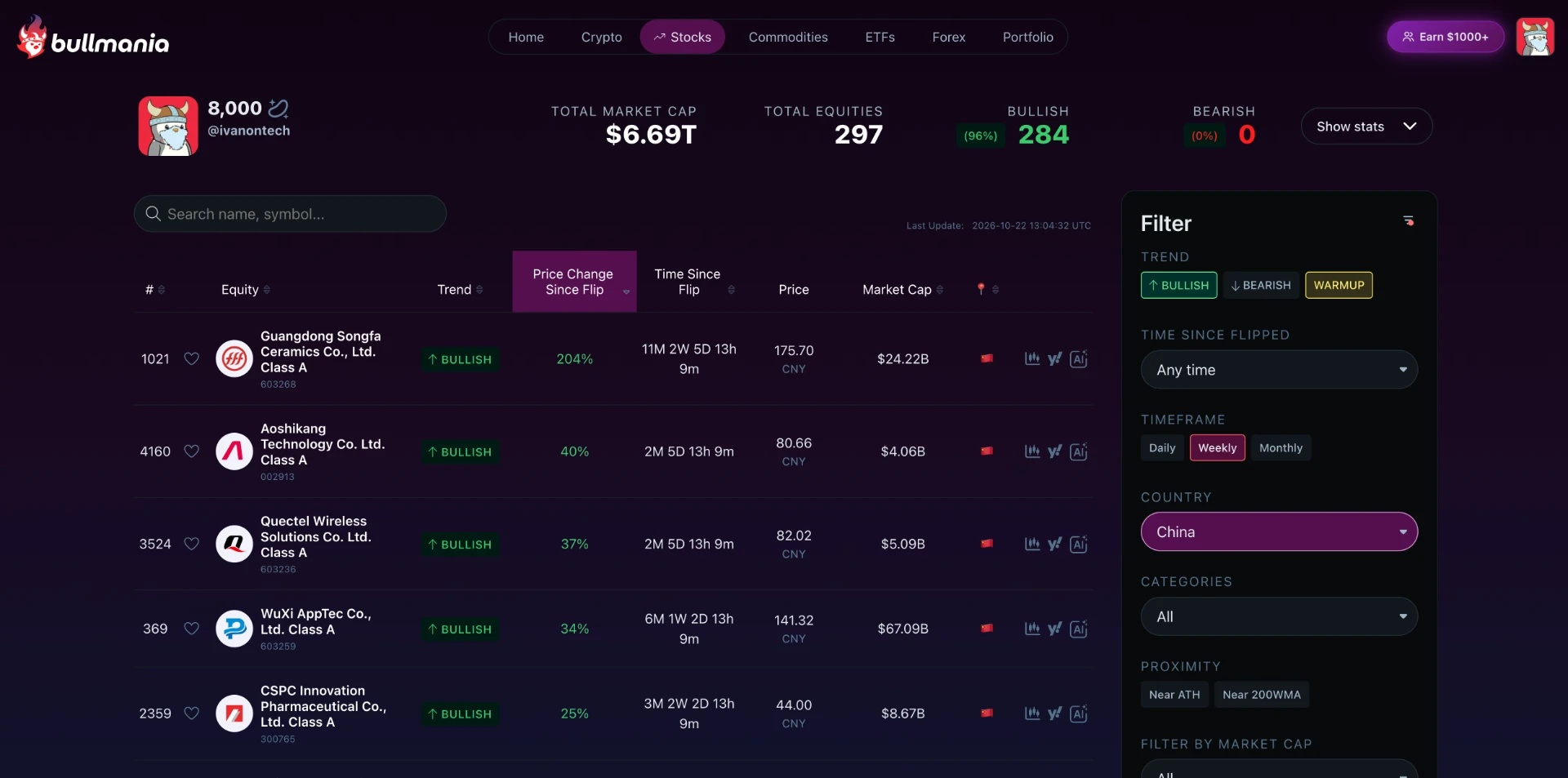
The country filter covers most countries in the world. United States, United Kingdom, the European Union, China, Germany, France, Canada, South Korea and Japan sit at the top, with a long list behind them, from Argentina and Australia to smaller markets. Supertrend is a single-chart indicator. It has no concept of scanning the whole stock market of one country, let alone most of the markets in the world at once.
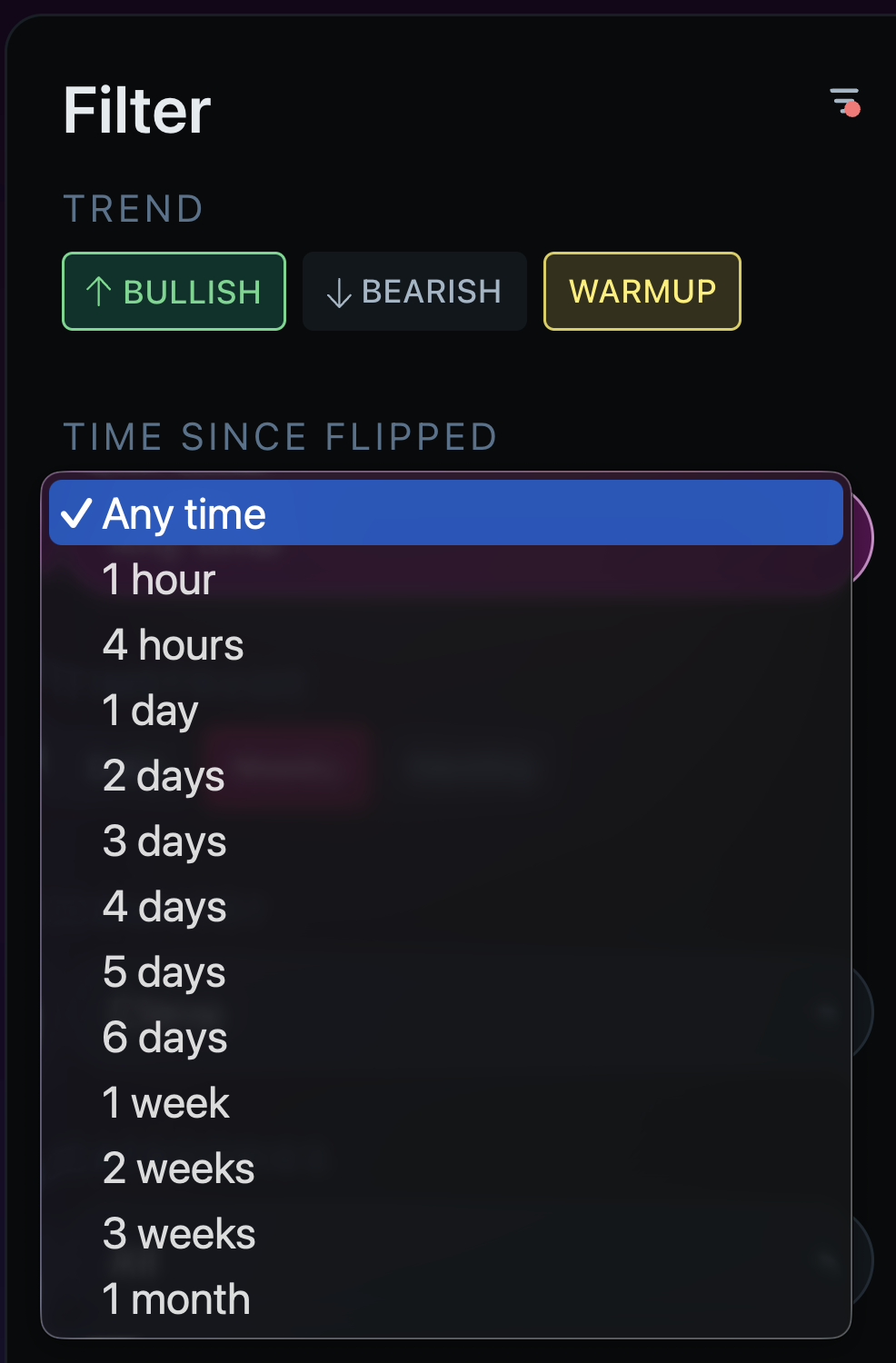
Time since flip narrows results to what just happened: the last hour, 4 hours, 1 day, up to 1 month, or any time. A flip from this morning and a trend that has run for six months are different situations, and the filter separates them.
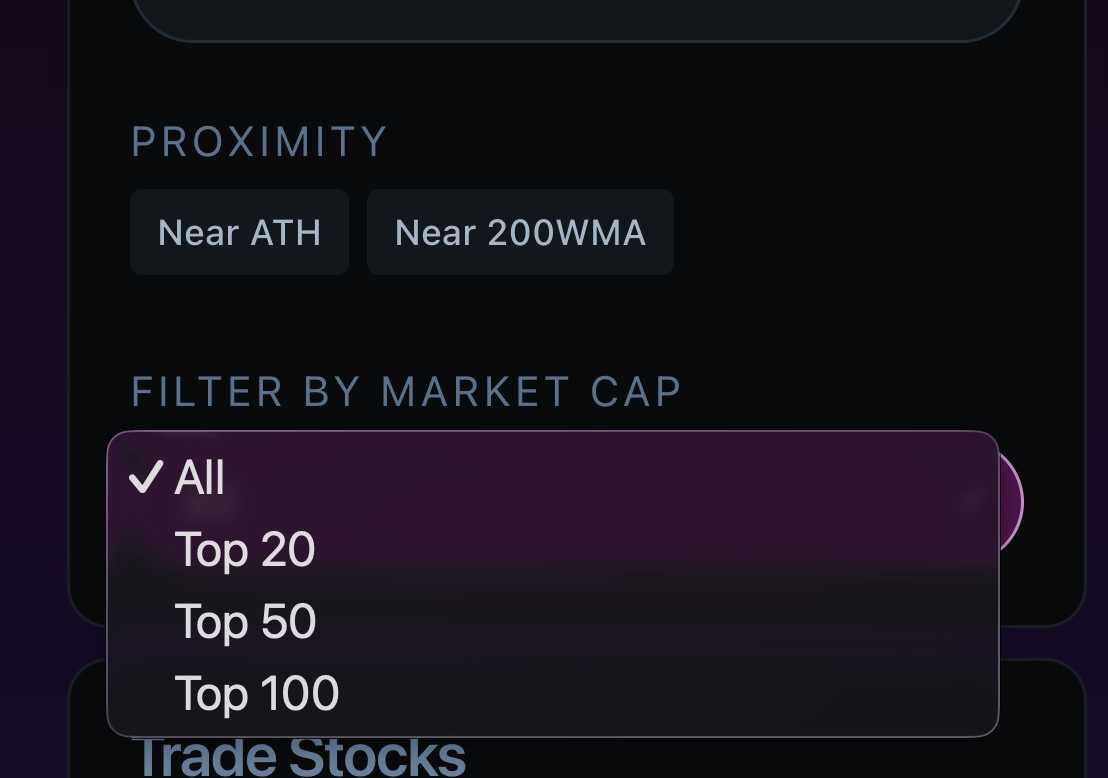
Proximity filters find assets trading near their all-time high or near the 200-week moving average, two levels investors watch closely. The market cap filter narrows the list to the Top 20, Top 50 or Top 100 assets, or any size at all.
Commodities, ETFs and forex: markets Supertrend cannot scan
Supertrend lives on one chart at a time. It cannot tell you what gold did this week, which ETF just flipped bullish, or whether the US dollar is trending against the Mexican peso. The Money Scanner applies MoneyLine across all of these markets at once, with the same trend, flip and filter logic everywhere. This is where the comparison stops being close.
Commodities: from gold to cocoa
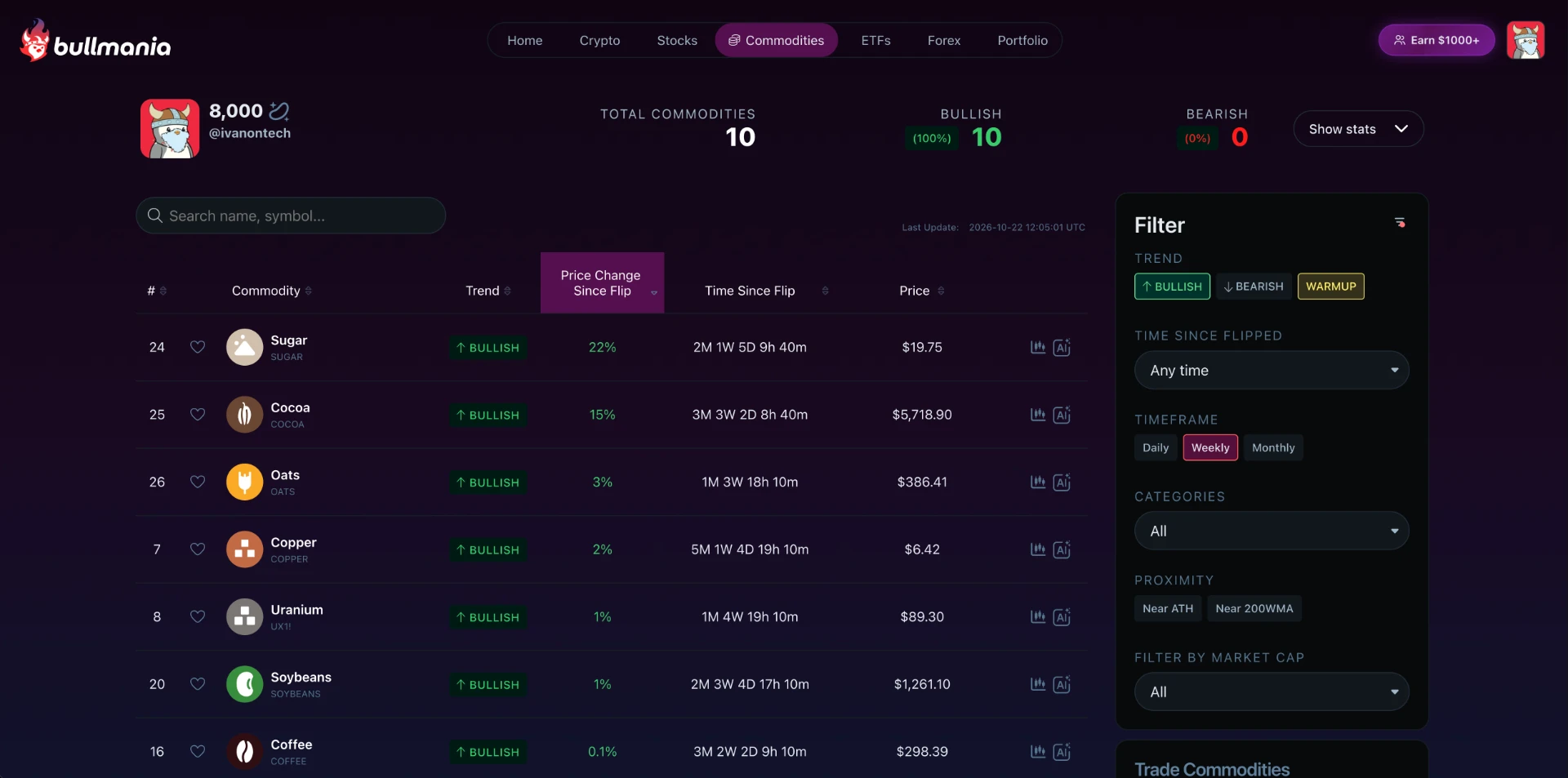
The Commodities tab tracks markets like sugar, cocoa, oats, copper, uranium, soybeans and coffee, each with its MoneyLine trend, price change since flip and time since flip. In the supplied October 22, 2026 snapshot, all ten tracked commodities were bullish on the weekly timeframe.
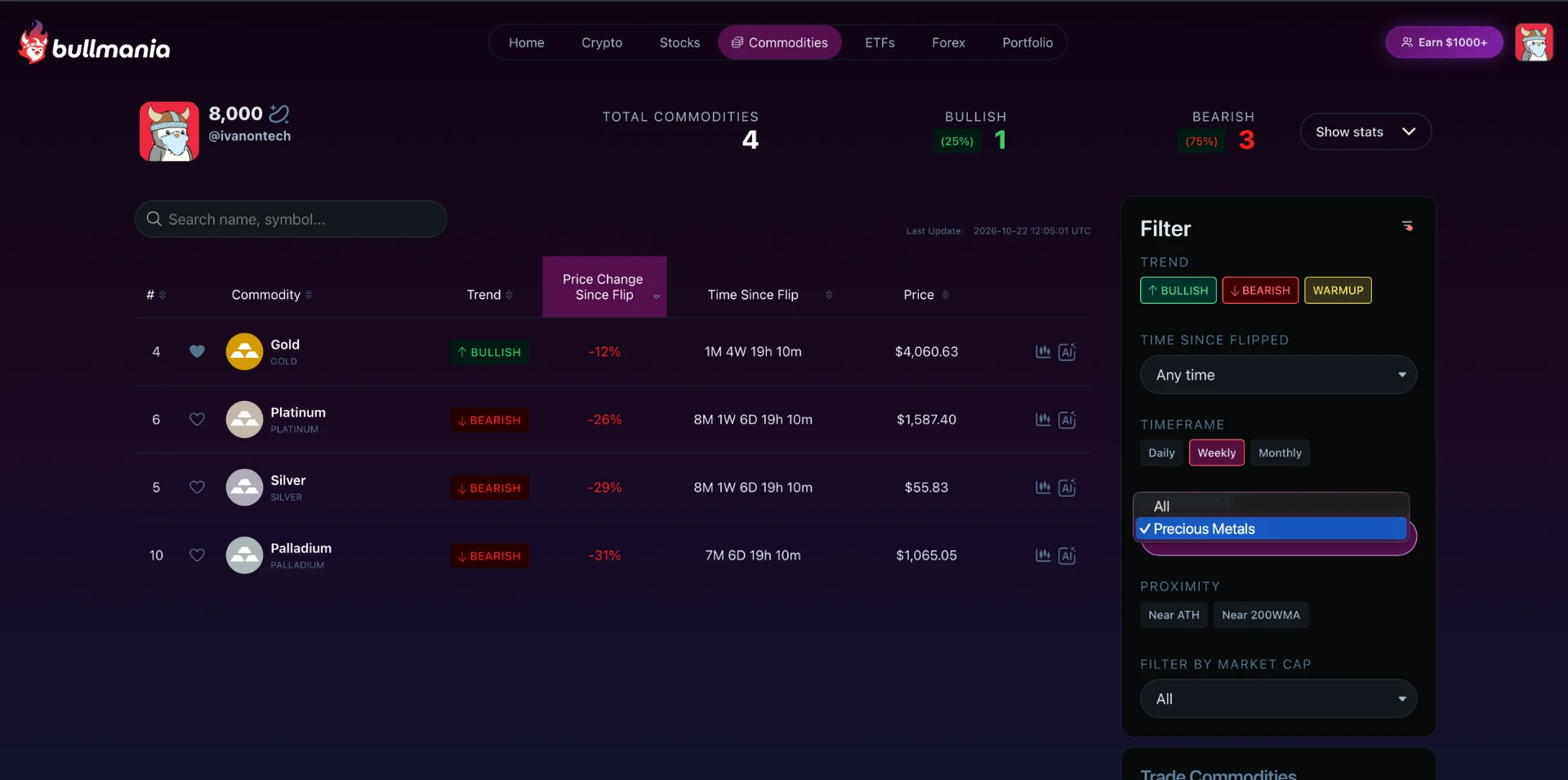
Categories let you zoom into one group. Filtering to precious metals shows gold, platinum, silver and palladium only, so a metals investor does not have to scroll past agricultural markets.
ETFs: most funds, every category
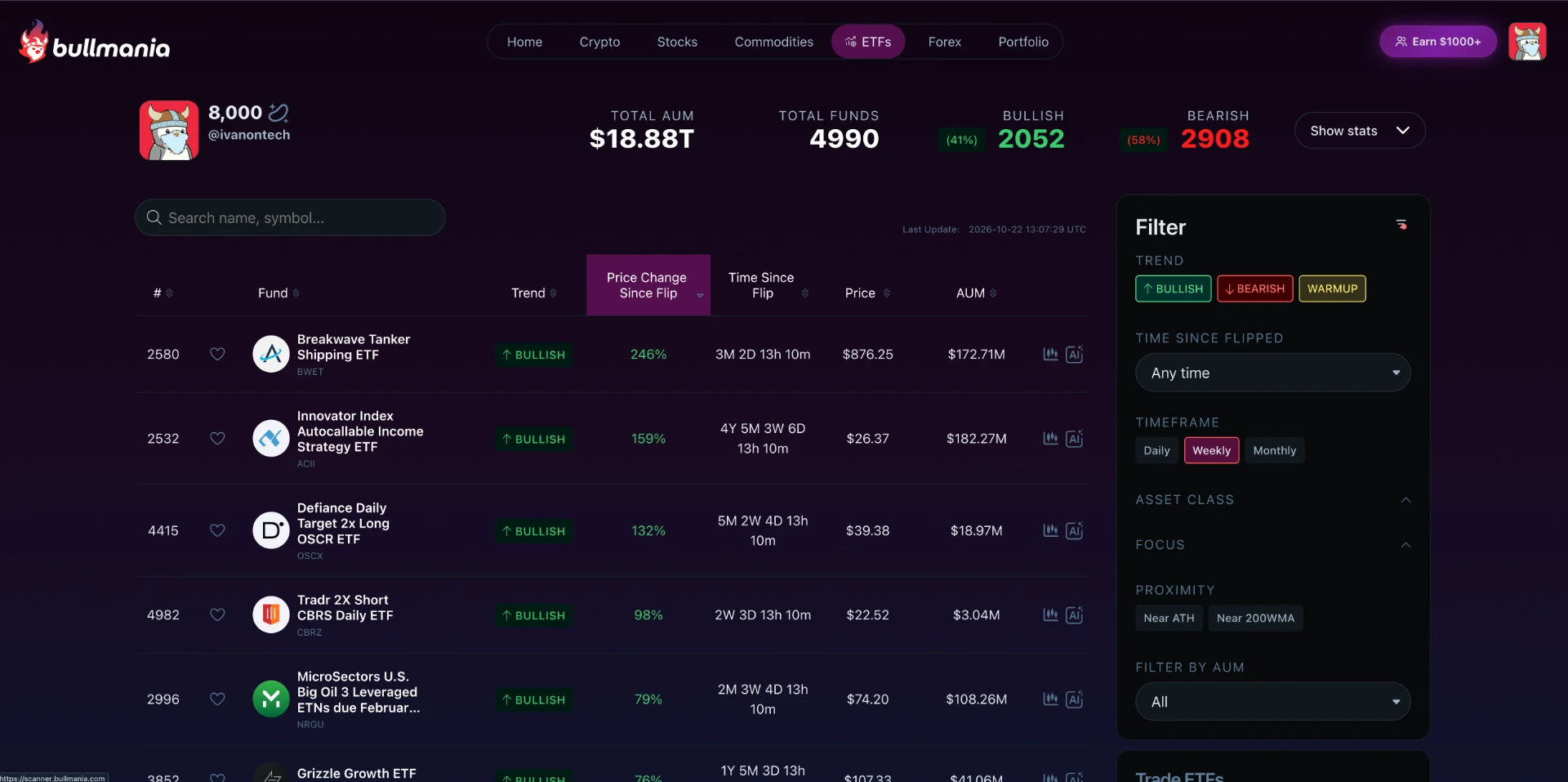
The ETFs tab covers most ETFs, close to 5,000 funds with nearly $19 trillion in combined assets under management in the supplied snapshot. Each fund shows its MoneyLine trend, price change since flip, price and AUM, sortable like every other market.
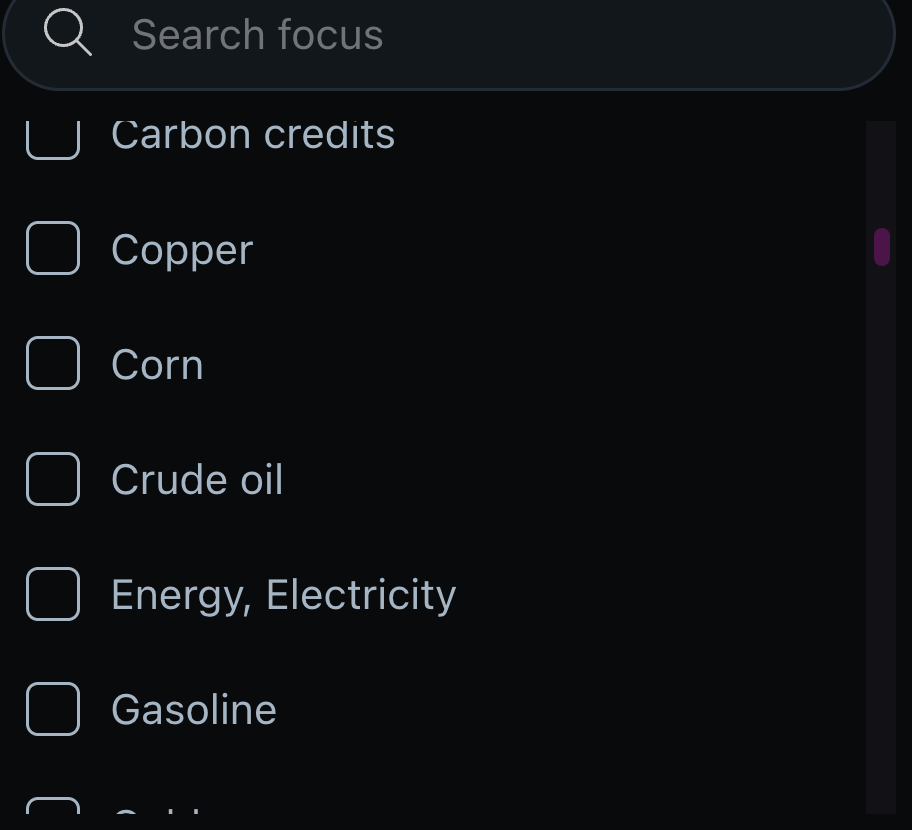
Focus filters narrow ETFs by what they hold: carbon credits, copper, corn, crude oil, energy and electricity, gasoline and many more. Looking for corn exposure that just turned bullish is a two-click question.
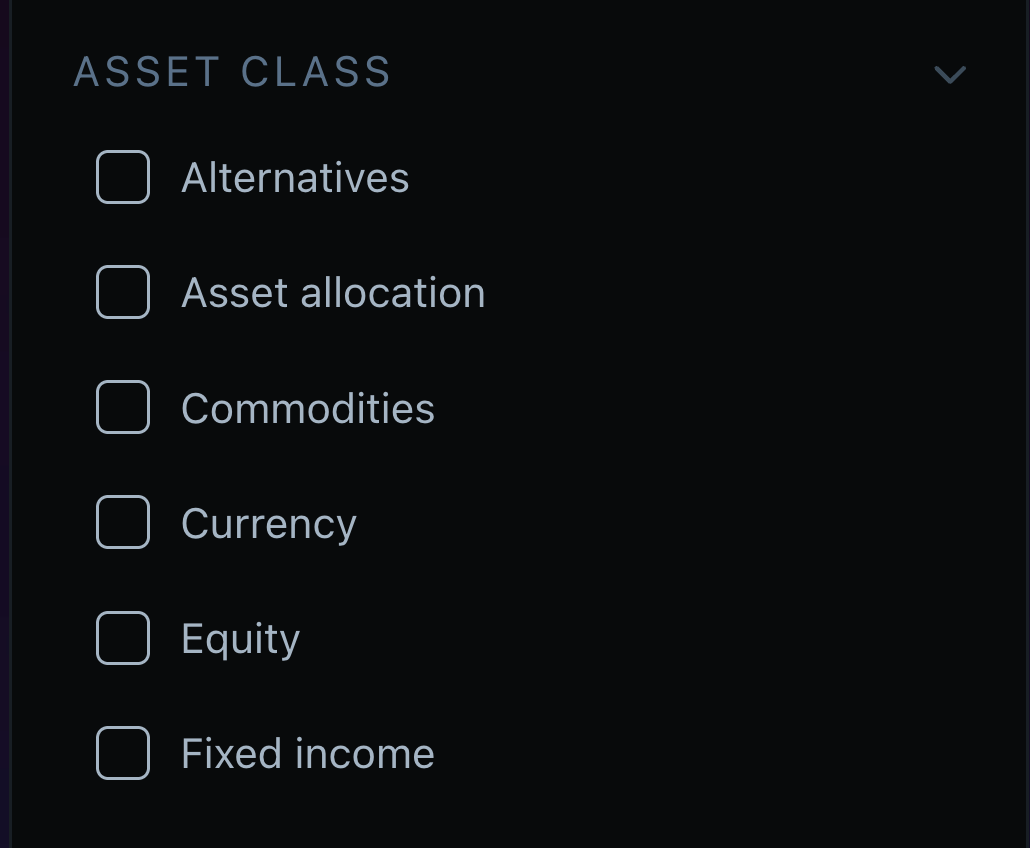
Asset class filters cover the full range: alternatives, asset allocation, commodities, currency, equity and fixed income. Combined with trend, timeframe and proximity filters, the Scanner answers questions no single-chart indicator can touch.
Forex: MoneyLine on currency pairs
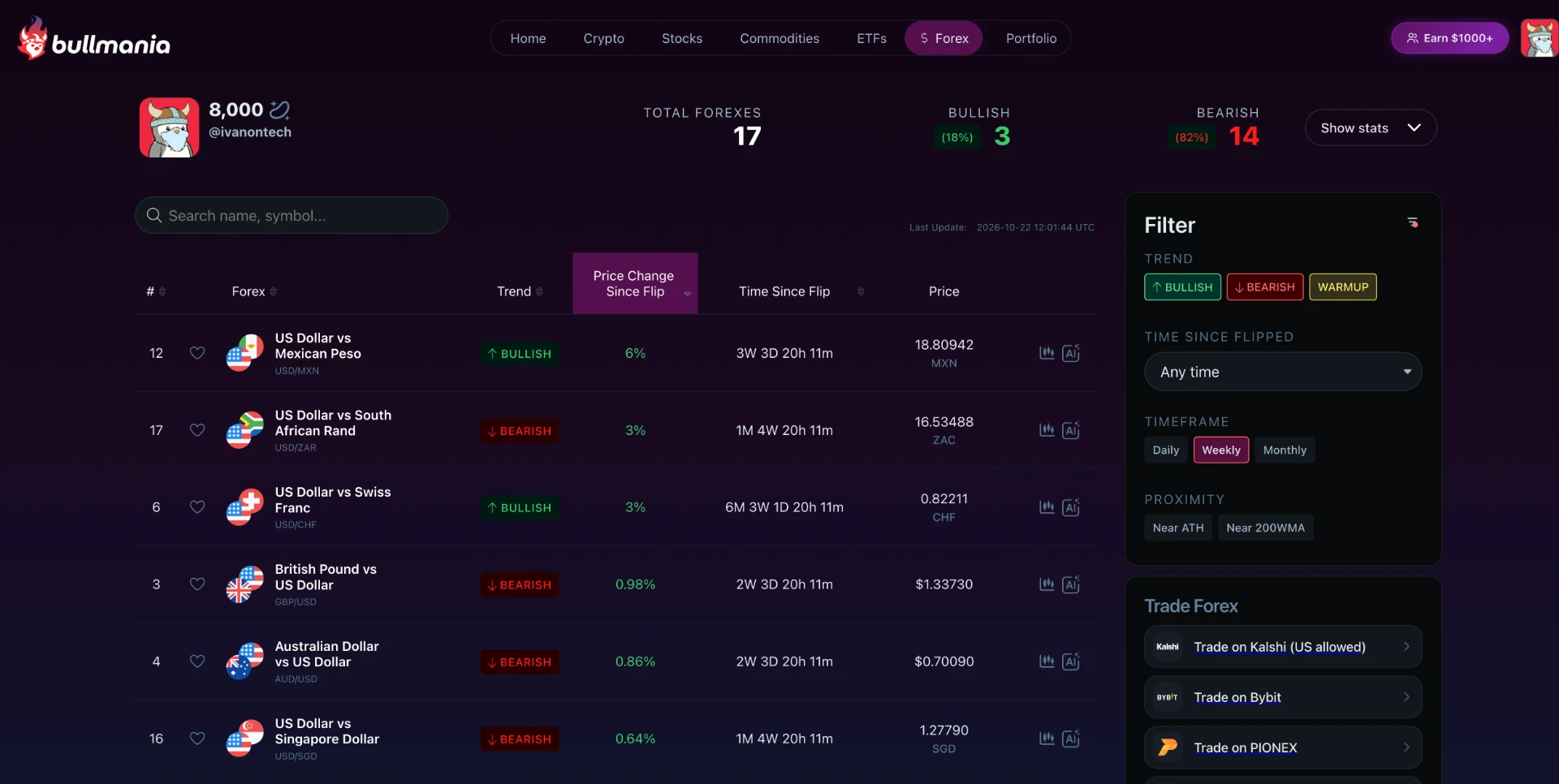
The Forex tab scans currency pairs with the same MoneyLine logic: trend, price change since flip, time since flip and current price. Majors like GBP/USD and AUD/USD sit next to pairs like USD/MXN, USD/ZAR, USD/CHF and USD/SGD.
In the supplied October 22, 2026 snapshot, 17 pairs were tracked on the weekly timeframe, with 3 bullish and 14 bearish. A currency trader sees the US dollar trend against a dozen currencies in one table, instead of checking twelve charts one by one.
The same filters apply here too: trend, time since flip, timeframe and proximity. Supertrend on a single forex chart cannot rank every pair by its freshest flip. The Scanner can.
Timeframe: 1-hour, 4-hour, 12-hour, daily, weekly or monthly.
Quote currency: USD, Bitcoin, Ethereum, Solana or the S&P 500.
Time since flip: separate recent signals from established trends.
Proximity: assets near their all-time high or 200-week moving average.
Market cap: narrow by asset size.
A coin can rise in dollars while falling against Bitcoin. Changing the quote currency helps identify benchmark outperformance rather than a general rising market. Price change since flip is not necessarily a trader’s realized return.
Does the Scanner work with Supertrend?
Bullmania’s Scanner uses MoneyLine states, flip dates and flip prices, not standard Supertrend signals. Other developers can build Supertrend-based scanners; that does not make them compatible with Bullmania’s MoneyLine dataset.
Bullmania AI: ask market questions in plain English
Bullmania AI uses the same MoneyLine data as the Scanner. Members can ask which stocks flipped bullish recently, which coins are bullish against Bitcoin or which assets are near a long-term level. Results can open charts with MoneyLine already applied.
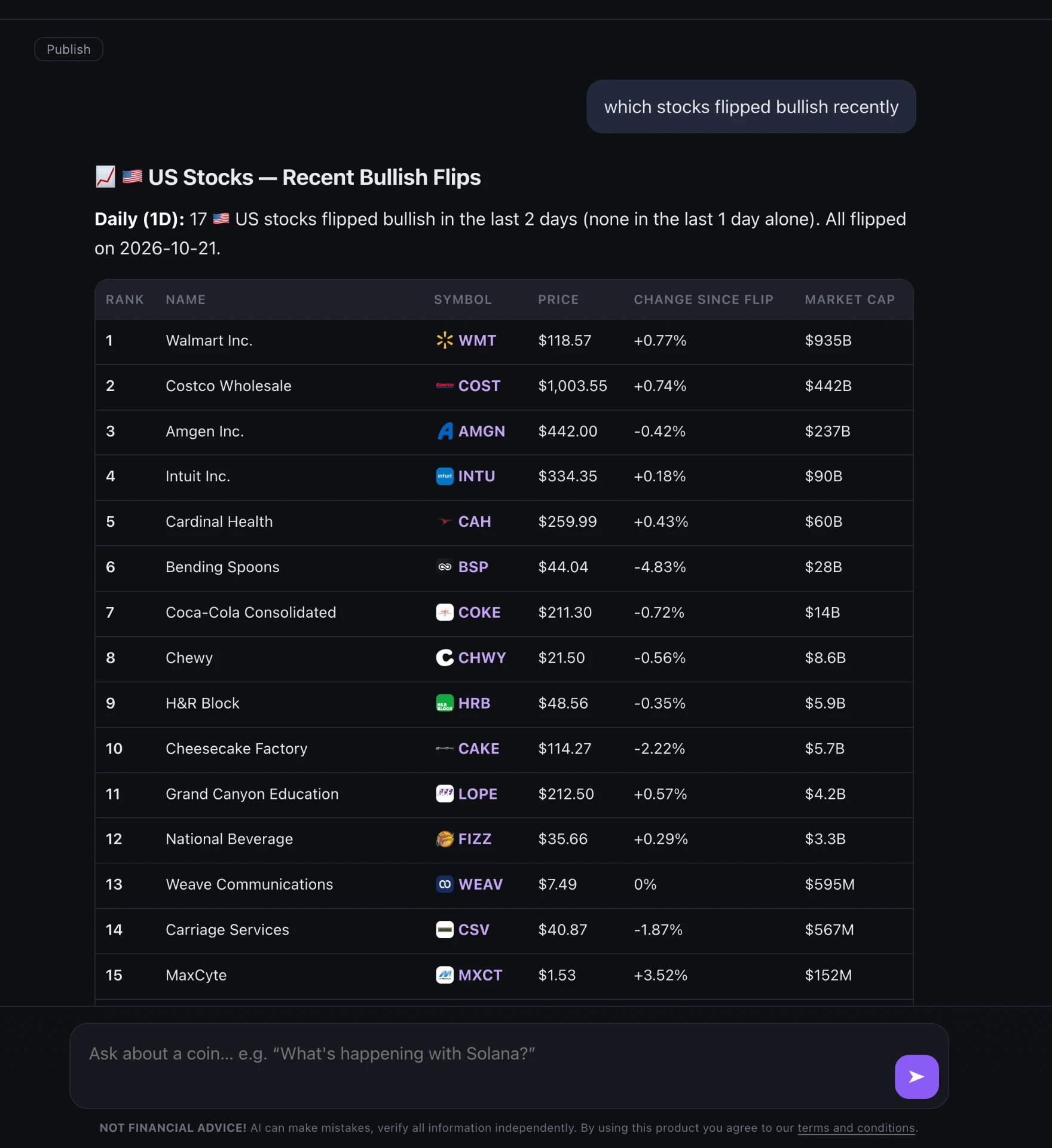
The supplied article also describes portfolio questions and discussion of what traders are saying on X. AI output should be checked against underlying charts and data. It is not a guaranteed explanation of why prices moved and does not replace judgment.
In the supplied October 22, 2026 example, it listed 17 US stocks with daily bullish flips on October 21, including Walmart, Costco, Amgen and Intuit. This is a dated product example, not a current recommendation.
How to build four practical Scanner screens
Find bullish stocks near the 200-week moving average
Open the Stocks tab.
Choose Weekly.
Filter for Bullish.
Enable Near 200WMA.
Sort by time since flip.
Or ask Bullmania AI: “Show me bullish stocks near the 200-week moving average.”
Find coins outperforming Bitcoin
Open the Crypto tab.
Set the quote currency to BTC instead of USD.
Choose Bullish and your timeframe, for example Weekly.
Sort by price change since flip.
Or ask: “Which coins are bullish against Bitcoin on the weekly?”
Find recent bearish flips near a major level
Choose a market tab.
Filter for Bearish.
Set time since flip to the last 2 days.
Enable Near 200WMA.
Or ask: “What flipped bearish in the last 2 days near the 200-week moving average?”
Find leaders near their all-time high
Choose a market tab.
Select Bullish and Daily or Weekly.
Enable Near ATH.
Narrow by market cap if needed.
Or ask: “Which bullish stocks are near their all-time high?”
These are research screens, not automatic buy/sell instructions. Proximity to a moving average or all-time high does not establish value, safety or a suitable entry.
Walkthrough: from a flip to a plan, Intuit in October 2026
This illustrates a Bullmania workflow, not a recommendation to trade Intuit.
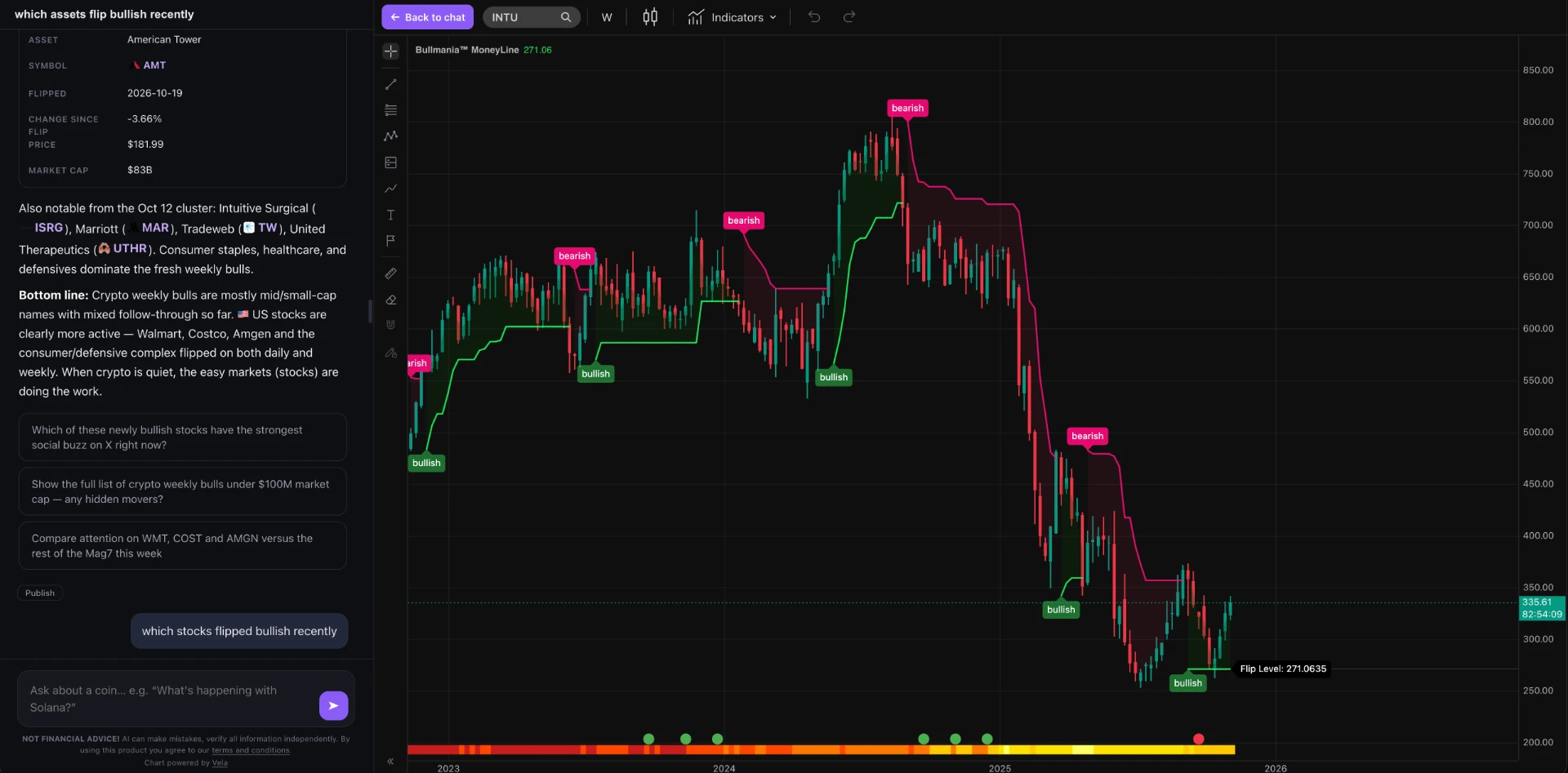
Spot the signal: Intuit appeared among the supplied daily bullish flips on October 21.
Check the bigger picture: the supplied weekly chart was bullish, with a Flip Level of $271.06 and price around $335.
Review macro context through the FRED Heat Map.
Inspect the backtesting table for the intended timeframe.
Apply written entry, stop-loss and position-sizing rules.
Decide the exit before entering the trade.
Bullmania’s stated framework separates long-term holdings from active trades. It teaches long-term holding for stock indexes, Bitcoin, precious metals and commodities, while treating altcoins and individual stocks as active trades. This describes Bullmania’s approach, not a universal rule or personalized advice.
Why an indicator alone is not a trading plan
MoneyLine, Supertrend, moving-average crossovers, MACD, ADX, Parabolic SAR, Ichimoku and other tools describe different aspects of trends. They do not all measure exactly the same thing: ADX, for example, measures trend strength rather than direction on its own.
Trend-following tools can lag and struggle in sideways markets. Indicator hopping after every loss rarely fixes missing risk management.
A trading plan must specify which assets deserve attention, which timeframe to use, whether higher-timeframe and macro context agree, where the stop belongs, how much to risk and what triggers the exit.
How MoneyLine fits Bullmania’s system
Separate long-term holdings from active trades.
Shortlist assets using the Money Scanner.
Use Bullmania AI for market research, checking answers against the data.
Review daily/weekly alignment and key long-term levels.
Execute using confirmed signals, stops and defined risk per trade.
Exit by the written rules rather than hope or fear.
Take MoneyLine out of this process and it is another line on a chart. The intended value is in the system around it.
What is included in the Bullmania ecosystem?
MoneyLine: trend line, Flip Level, confirmation settings, multi-timeframe context, FRED Heat Map and backtesting table.
Money Scanner: filterable MoneyLine signals across multiple markets.
Bullmania AI: conversational market research using MoneyLine data, with portfolio features described in the supplied article.
Mechanical rules: written entries, exits, stop losses and position sizing.
MoneyLine is part of Bullmania membership, not a standalone indicator. Membership does not remove trading risk.
Common mistakes with trend indicators
Changing indicators or settings after every losing trade.
Ignoring daily/weekly context when acting on a lower-timeframe flip.
Trading every signal without checking the asset’s behavior.
Entering without a stop-loss plan.
Oversizing a position.
Treating macro context as a guarantee.
Ignoring an exit because you hope the trend will return.
Who MoneyLine is for, and who it is not for
MoneyLine may suit someone seeking a rules-based trend process, cross-market scanning, macro context and a way to inspect historical signals on their own charts.
It may not suit someone wanting guaranteed buy/sell instructions, pure fundamental investing, very short-term scalping or a standalone indicator without the wider ecosystem. It also requires a willingness to follow risk and execution rules.
Glossary
Term | Meaning |
|---|---|
Flip | Change between bullish and bearish states |
Flip Level | Displayed threshold relevant to the next change, subject to confirmation rules |
Last Flip | Price and date of the most recent trend change |
Since Flip | Percentage price change since flip, not a guaranteed trading return |
Confirmation candles | Candles required to confirm a signal |
Confluence | Agreement between trends on different timeframes |
Near 200WMA | Price is close to its 200-week moving average |
Near ATH | Price is close to its all-time high |
FRED Heat Map | Macroeconomic data displayed alongside the chart |
Backtesting table | Historical signal behavior for the selected chart and settings |
Quote currency | Currency or benchmark an asset is priced against |
Money Scanner | Bullmania’s cross-market tool using MoneyLine signals |
Bullmania AI | Bullmania’s conversational tool using MoneyLine data |
Mechanical rules | Written entry, exit, stop-loss and position-sizing rules |
Frequently asked questions
Is MoneyLine the same as Supertrend?
No. MoneyLine shares the Supertrend concept but adds Bullmania’s tuning, confirmation settings, Flip Level, chart context, backtesting and connections to the Scanner and trading rules.
Is MoneyLine better than Supertrend?
It depends on your requirements and testing. MoneyLine is designed to reduce repeated lower-timeframe flips and provide a wider workflow, but this does not prove higher returns. Compare equal assets, timeframes, periods and realistic trading costs.
What timeframe works best for MoneyLine?
There is no universal best timeframe. Bullmania describes support from 1-hour to monthly. Choose a timeframe that fits your plan and inspect historical behavior and higher-timeframe alignment.
Does MoneyLine use macroeconomic data?
Its built-in FRED Heat Map displays macro data alongside the trend. This is context; it should not be assumed to change the trend calculation directly.
What is the Bullmania Money Scanner?
It applies MoneyLine across multiple markets, with filters for trend, timeframe, quote currency, time since flip, market cap and proximity to long-term levels.
Can I use the Scanner or Bullmania AI with Supertrend?
Bullmania’s integrations use MoneyLine data, not standard Supertrend signals. This does not imply that other Supertrend scanners cannot exist.
Can I backtest MoneyLine?
Yes. Its integrated table shows historical signal behavior for the selected asset, timeframe and confirmation setting. Past results do not guarantee future performance.
Any backtesting examples, assets, charts, trades or scenarios shown are examples used to explain the method, not recommendations or signals. Historical data, backtests and past examples do not predict future results or future performance of the indicator.
Does MoneyLine have a neutral state?
No. Bullmania describes two states: bullish or bearish.
Can I use MoneyLine for stocks, forex and commodities?
Yes. The Scanner covers crypto, US stocks, ETFs, commodities and forex.
What is the best trend indicator?
No single indicator is best for every asset, market condition and trading style. Consistent rules, testing and risk management matter more than declaring one tool universally superior.
Is an indicator enough to trade with?
No. A complete plan also addresses assets, entries, exits, stops, position sizing and disciplined execution.
Sources and further reading
MoneyLine feature descriptions and dated examples are from Ivan Liljeqvist’s supplied Bullmania article, dated October 22, 2026. This is first-party product material, not an independent comparison. Chart pictures have not yet been added.
TradingView: Supertrend definition and calculation
TradingView: Average True Range (ATR)
FRED: Federal Reserve Bank of St. Louis economic data
About the author
Ivan Liljeqvist, also known as IvanOnTech, is Bullmania’s founder. This article explains how Bullmania positions MoneyLine, the Money Scanner and its mechanical trading rules. As the founder, Ivan has a commercial interest in Bullmania.
Educational content only, not financial advice. Trading involves risk, including loss of capital. Past performance and backtests do not guarantee future results. Chart examples are dated October 22, 2026 and are not live market data.